Modern, reliable, and scalable system for collecting, storing, processing, and presenting real-time data at enterprise scale
What's this for
As an IT director, I want a reliable, scalable system for collecting and storing real-time data that can be implemented using FSTEC-certified software components and used at critical information infrastructure (CII) facilities
As a specialist and production manager, I want simple, fast access to production real-time data with any depth of history, with the ability to analyze it, visualize it, and process it in application systems—for example, in spreadsheets
iXyber MES Historian - provides real-time data acquisition and initial processing, object-based representation, long-term storage, and delivery to other information systems.
Key advantages
High reliability — data buffering on interfaces, configuration and history backup.
Flexible architecture — separated interfaces for data collection or integrated with server components. No limits on the number of data interfaces.
Ability to choose the database on each node: PostgreSQL or ClickHouse, with a single application-level interface for database access.
Data collection interfaces: OPC DA, OPC AE, OPC UA, Modbus, SQL. It is possible to develop an interface for any protocol.
Collection and storage of continuous data and events. Unified representation of events from external sources and from the internal iXyber Platform, with unified tools for processing them.
Representation of data in an object model with arbitrary hierarchy and structure. Programmatic data processing using Python scripts.
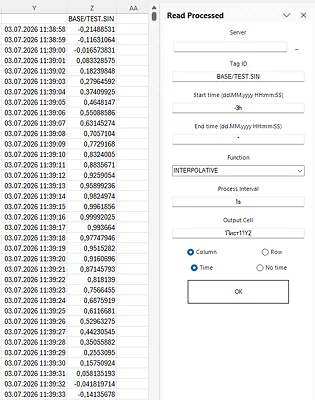
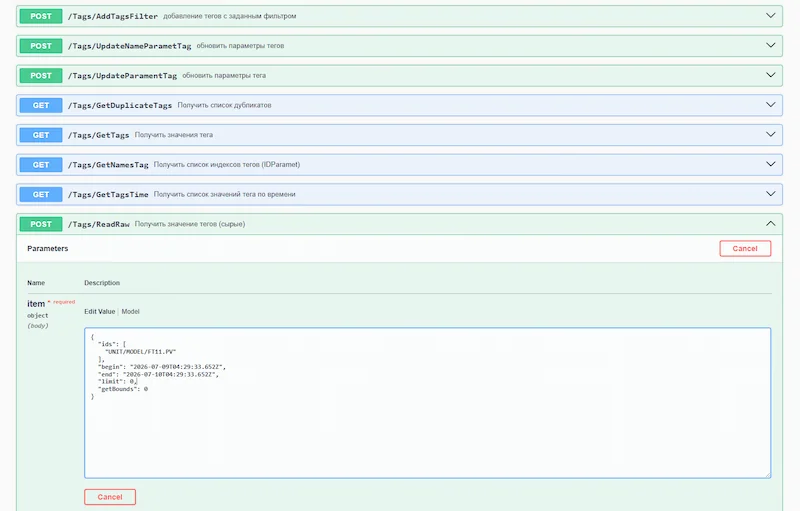
ccess to data via OPC UA, API, WebAPI, and add-ins for Microsoft Excel, LibreOffice Calc, P7 Office. Query raw and processed data (average, min, max, standard deviation, interpolated, etc.).
High reliability and performance:
Write up to 800,000 values/sec;
Read 2.5 million/sec.
Dozens of projects already implemented based on iXyber Historian.
Architecture
The solution's modern distributed cross-platform architecture ensures high reliability and performance.
Interfaces can be deployed on separate interface nodes or combined with history storage nodes;
Two database options are available on each history node:
PostgreSQL — for mission‑critical applications, including FSTEC‑certified versions;
ClickHouse — for high‑performance solutions.
Data collection from sources
Interfaces for data collection: OPC DA, OPC AE, OPC UA, Modbus, SQL. Creating an interface for any protocol.
Interface components separated onto individual nodes or combined with the storage server;
Data collection via polling or change event, data filtering on the interface;
Data buffering on interfaces to enhance reliability;
Event collection via OPC AE protocol or direct access to event databases of the control system (RSU).
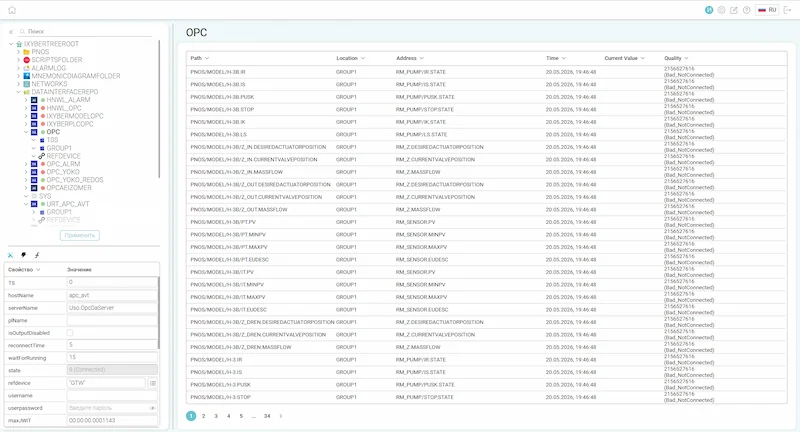
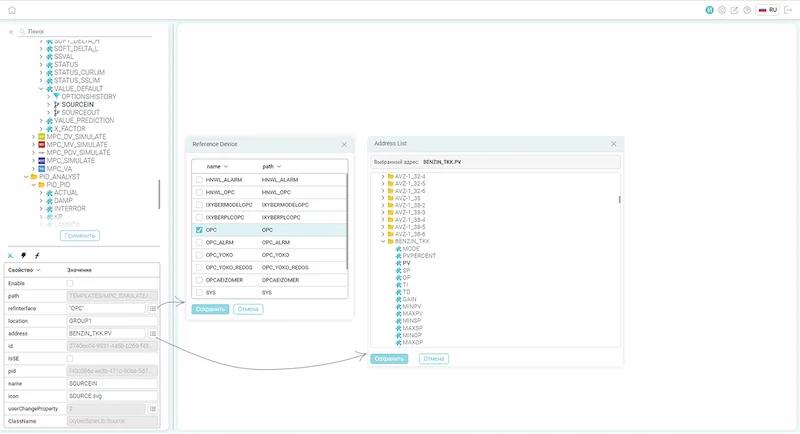
Interface configuration
Parameter configuration
Properties
TS — timestamp source.
Determines which timestamp to use when writing parameter values:
0 — time of the data source server (OPC DA server).
1 — platform time.
hostName — OPC server node name.
Name or address of the computer on which the OPC DA server is running.
serverName — OPC server name.
Program identifier (ProgID) of the OPC DA server.
isOutputDisabled — disable writing from the platform.
If enabled, the interface works in read-only mode. Used as a safeguard when the interface is intended for data collection only.
reconnectTime — wait time before reconnecting.
Number of seconds the interface waits before attempting to reconnect to the OPC server after a connection loss.
waitForRunning — wait time for transition to the RUNNING state.
Number of seconds to wait for the OPC server to transition to the RUNNING state after connecting. Reconnects if unsuccessful.
refdevice — interface execution device.
Reference to the device (node) on which the interface instance will physically run — locally or on a remote machine.
Interface configurationParameter configuration
Data representation and processing
Data representation and processing based on an object model of industrial (production) assets.
Object model
Script managementTask management
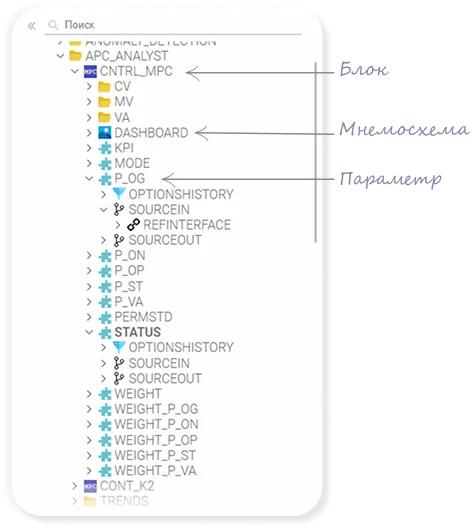
Creation of objects of any structure and hierarchy depth
based on a combination of data structures:
Block – can contain any other objects;
Parameter – stores a value, accumulates history, and can be bound to other parameters (for reading and writing);
Mnemonic diagrams – contains an iXyber Vision mnemonic diagram
Ready-made object templates for various classes: sensor, control valve, shut-off device, PID controller, pump, heat exchanger, etc.
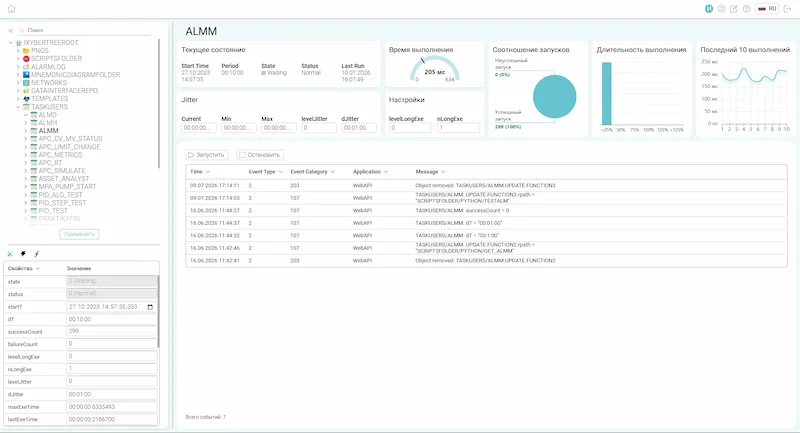
Unified representation of external events from data sources and system events (system, application, user) to standardize processing.
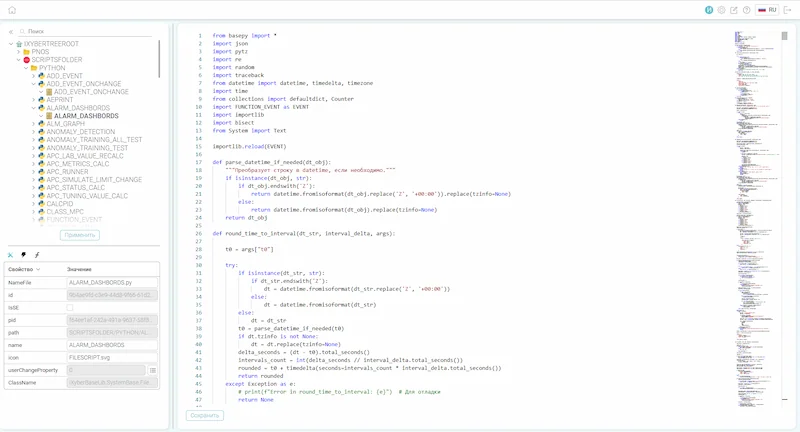
Event processing of the object model in Python. Built-in Python script editor. Event- and schedule-based tasks, task dispatcher.
Object model
Script management
Task management
Object model
Script management
Task management
Creation of objects of any structure and hierarchy depth
based on a combination of data structures:
Block – can contain any other objects;
Parameter – stores a value, accumulates history, and can be bound to other parameters (for reading and writing);
Mnemonic diagrams – contains an iXyber Vision mnemonic diagram
Ready-made object templates for various classes: sensor, control valve, shut-off device, PID controller, pump, heat exchanger, etc.
Unified representation of external events from data sources and system events (system, application, user) to standardize processing.
Event processing of the object model in Python. Built-in Python script editor. Event- and schedule-based tasks, task dispatcher.
Data storage
Long-term data storage in a real-time database.
Databases available:
PostgreSQL – for critical applications, including those requiring FSTEK-certified versions;
ClickHouse – for high-performance solutions;
Data volume control by occupied storage and/or time, cyclic data overwrite;
Data filtering algorithm for storage: Swinging Door;
Database load distribution using DBMS tools;
Subsystem configuration backup on demand or according to a schedule;
Historical data backup using database tools or external means.
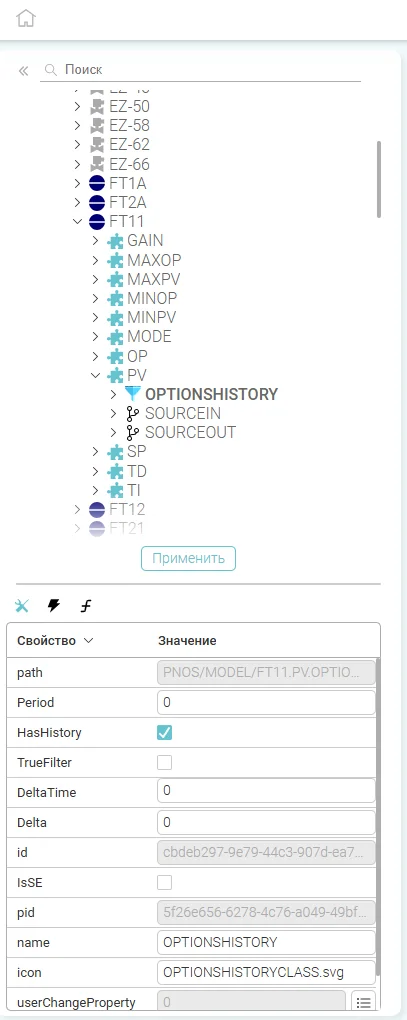
Period - History discretization period in seconds.
The time interval (in seconds: 0, 1, 2, 5, 10, 30, 60, 300) for polling/checking the parameter value for possible archiving.
HasHistory - Archive to history.
A flag to enable or disable parameter archiving.
TrueFilter - Enable data filtering when archiving to history.
Activates data compression/filtering algorithm upon archiving.
DeltaTime - Maximum interval between records.
The maximum time (in seconds) during which it's allowed not to write a new point even if the value hasn't changed significantly. After DeltaTime expires, the point is recorded automatically; this prevents loss of tag data in the archive and confirms that the data source is functioning.
Delta - Significant change threshold.
This is the minimum change in parameter value that is considered "significant" and therefore archived. If the new value differs from the last recorded value by less than Delta, the value is not archived (treated as noise or insignificant fluctuation).
History configuration for a tag
Tag storage structure
Time
The exact timestamp (date and time) when the tag value was recorded.
Value
The value of the tag at the time of recording.
Quality
Good: Data received from the source without errors;
Uncertain: Data is present, but its accuracy is questionable (e.g., calibration, partial loss of connection);
Bad: Data is missing or received with a critical error.
Event storage structure
Time
The exact timestamp (date and time) when the event occurred or an alarm was triggered.
Event Type
Numerical identifier of the event type. In industrial systems, this code typically represents: a one-time notification, tracking event, or conditional event.
Event Category
Numerical code of the event group. The category determines to which logical or technological group the event belongs and which additional data (attributes) will be included.
Application
Name of the application from which the event was received.
Message
Detailed textual description of the event.
Class Message
Defines the criticality level (priority) or handling rules for the specific notification.
Databases available:
PostgreSQL – for critical applications, including those requiring FSTEK-certified versions;
ClickHouse – for high-performance solutions;
Data volume control by occupied storage and/or time, cyclic data overwrite;
Data filtering algorithm for storage: Swinging Door;
Database load distribution using DBMS tools;
Subsystem configuration backup on demand or according to a schedule;
Historical data backup using database tools or external means.
History configuration for a tag
Period - History discretization period in seconds.
The time interval (in seconds: 0, 1, 2, 5, 10, 30, 60, 300) for polling/checking the parameter value for possible archiving.
HasHistory - Archive to history.
A flag to enable or disable parameter archiving.
TrueFilter - Enable data filtering when archiving to history.
Activates data compression/filtering algorithm upon archiving.
DeltaTime - Maximum interval between records.
The maximum time (in seconds) during which it's allowed not to write a new point even if the value hasn't changed significantly. After DeltaTime expires, the point is recorded automatically; this prevents loss of tag data in the archive and confirms that the data source is functioning.
Delta - Significant change threshold.
This is the minimum change in parameter value that is considered "significant" and therefore archived. If the new value differs from the last recorded value by less than Delta, the value is not archived (treated as noise or insignificant fluctuation).
Tag storage structure
Time
The exact timestamp (date and time) when the tag value was recorded.
Value
The value of the tag at the time of recording.
Quality
Good: Data received from the source without errors;
Uncertain: Data is present, but its accuracy is questionable (e.g., calibration, partial loss of connection);
Bad: Data is missing or received with a critical error.
Event storage structure
Time
The exact timestamp (date and time) when the event occurred or an alarm was triggered.
Event Type
Numerical identifier of the event type. In industrial systems, this code typically represents: a one-time notification, tracking event, or conditional event.
Event Category
Numerical code of the event group. The category determines to which logical or technological group the event belongs and which additional data (attributes) will be included.
Application
Name of the application from which the event was received.
Message
Detailed textual description of the event.
Class Message
Defines the criticality level (priority) or handling rules for the specific notification.
Access to Data
Access to historical and real-time data of the object model.
We use the Yandex.Metrica web analytics service to improve the performance of our website. By continuing to use the site, you agree to the terms of our Personal Data Privacy Policy.








 Interface configuration
 Parameter configuration









 iXyber MES Vision